Compare records lets you compare two records from your duplicate store to see exactly why they were or were not matched as duplicates by Aperture Match. This makes it easy to identify potential configuration changes that may be needed.
You can search for records to compare using either the record IDs or "Level All" cluster IDs. When searching for multiple IDs, separate them using either a space or one of the following characters: ',' ';' '|' '/' '\'. IDs that contain delimiters must be enclosed in double quotes.
Once you have carried out your search, you will be presented with a list of records to choose from. Pick the two records that you would like to compare by selecting the checkbox to the left of each record and then click the Analyze button.
You will then be able to view each record in its standardized form so you can see the final values used by Aperture Match to determine if the two records are duplicates. The following example shows two records after they have been standardized:
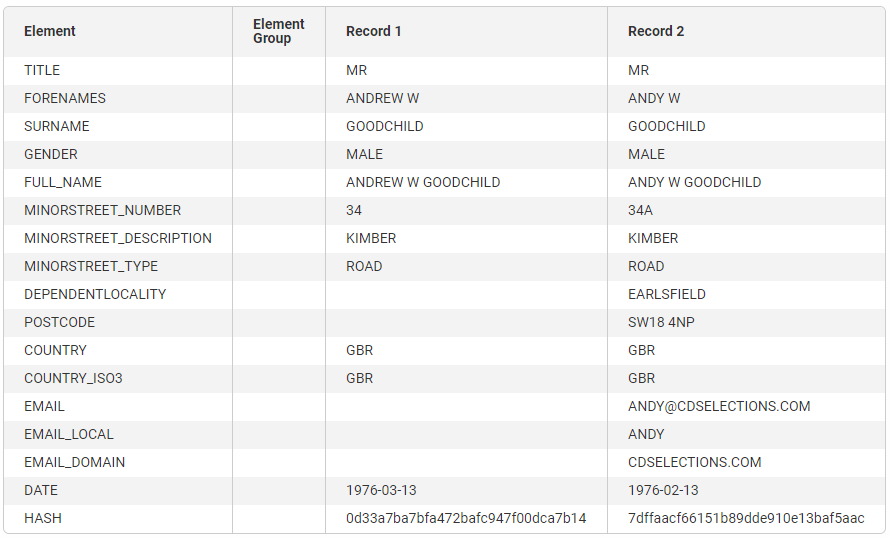
Below standardization, you will find a comparison of each of the generated blocking keys. A blocking key highlighted in green means this blocking key resulted in the two records being "blocked" (i.e. scored) together. If no blocking keys are highlighted, it means the two records did not reach the scoring stage and will not be considered a match regardless of how they are evaluated against the match rules.
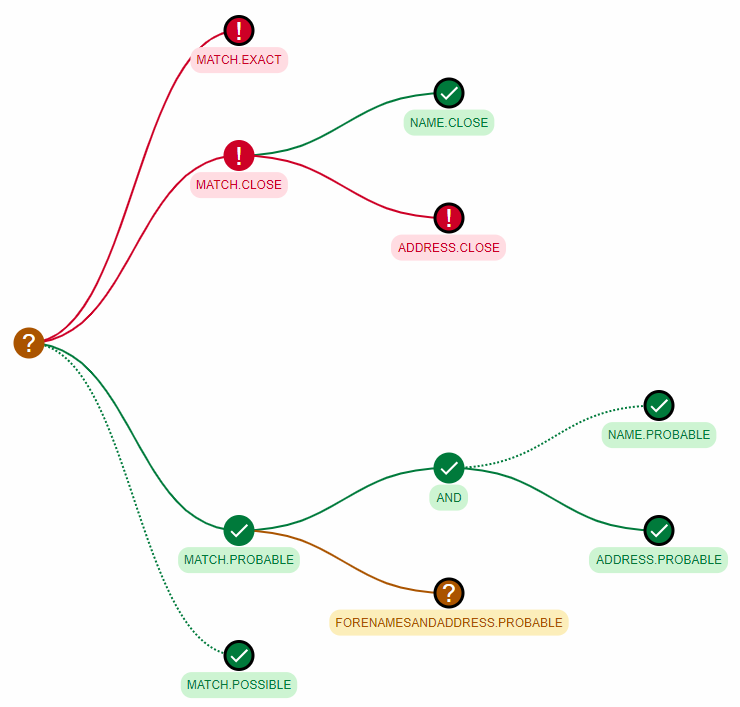
The visualize rules section shows how the two selected records are evaluated against the rules. The leftmost nodes represent the different match levels, each of which can be expanded by clicking on them to show the tree of rules which were evaluated to cause the pair of records to either be matched or not matched. You can further expand any of the rule nodes to see the sub-rules which compose that rule for a complete breakdown of the final match result.
There are four different rule nodes:
In addition, an AND node is used to represent the logical AND operation for rules. All rule nodes directly following an AND node must pass for that node to be considered a pass.
In the following example: